
GUI filtering#
Use the Filtering tab to apply an image transform before feature extraction. Filtering is optional and operates on images; masks are not required. For Python examples, see Python filtering.
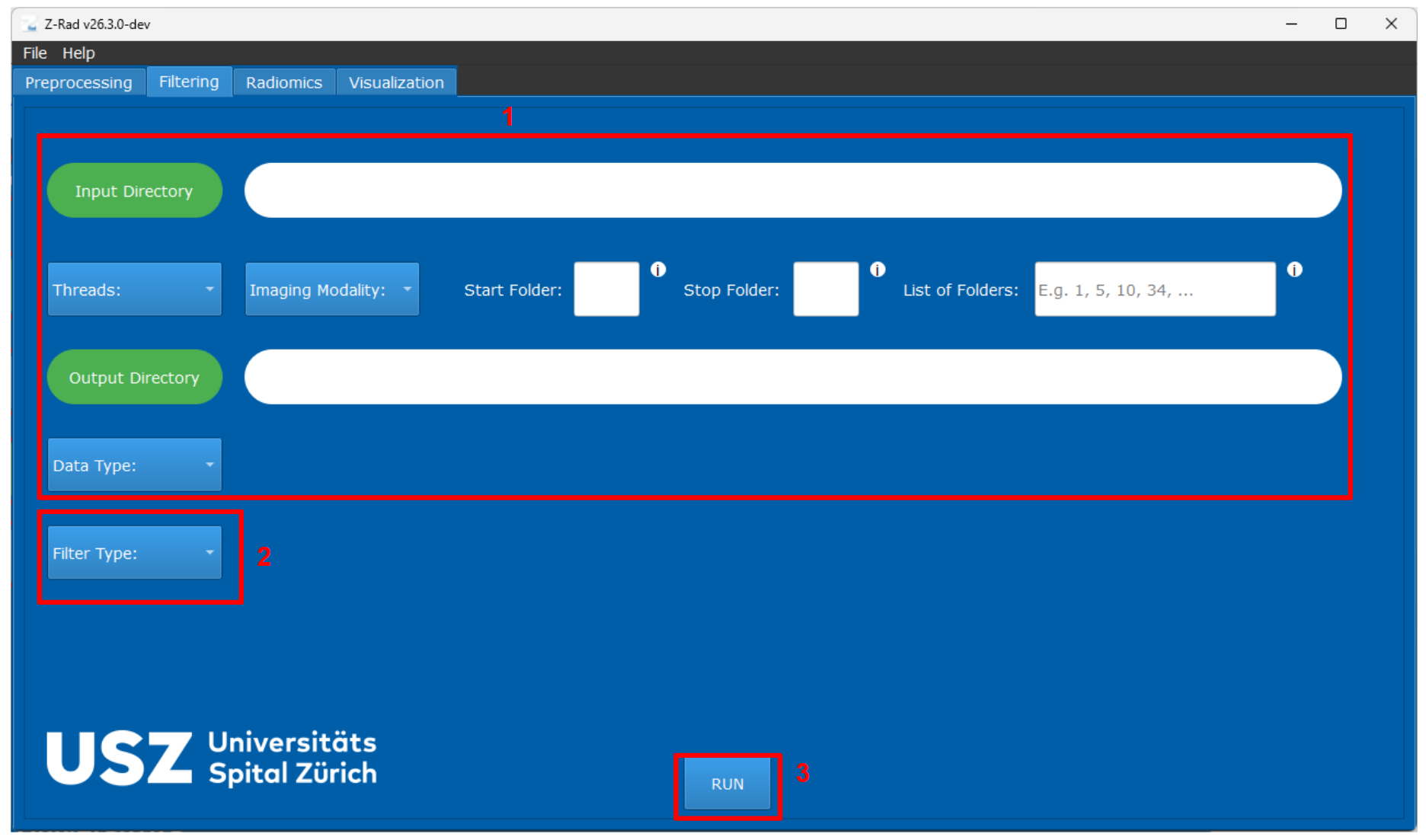
Filtering tab in the GUI.#
Main controls#
The numbers below match the annotated screenshot.
(1)Upper workflow sectionThe upper part of the filtering tab mirrors the preprocessing tab. You use it to select the input directory, output directory, thread count, imaging modality, and the folders that should be processed. Unlike preprocessing, no mask selection is required because filtering is applied to images only.
(2)Filter TypeSelect a filter to show its settings. The available families are described below.
(3)RUNStarts the filtering process. The filtered images are written to the selected output directory.
Filter parameters#
Depending on the filter, choose padding (how image boundaries are extended), 2D or 3D processing, and scale parameters such as the Gaussian width or wavelength in millimetres.
Filter |
Main parameters and units |
|---|---|
Mean |
Support is the kernel side length in voxels. Select 2D for a square neighbourhood or 3D for a cube. |
Laplacian of Gaussian (LoG) |
Sigma is the Gaussian scale in millimetres; cutoff is the kernel radius in multiples of sigma. Select 2D or 3D processing. |
Gabor |
Resolution, sigma, and wavelength are in millimetres. Gamma controls the kernel’s aspect ratio. Theta is an angle in radians, or the angular step when rotation invariance is enabled. Orthogonal-plane averaging combines responses from three slice orientations. |
Laws kernels |
The response map selects kernels, such as |
Separable wavelets |
Choose Daubechies 2 or 3, first-order Coiflet, or Haar; then the low/high-pass response map, decomposition level, and rotation invariance. |
Riesz-transformed LoG |
LoG sigma and cutoff, plus a Riesz order and optional structure-tensor scale in millimetres. See the constraints below. |
Simoncelli wavelets |
Decomposition level, padding, and optional Riesz order. See below for the supported padding and order conventions. |
For separable wavelets, choose the wavelet family, response map (the low- and high-pass combination), and decomposition level. Rotation invariance is optional.
Riesz-transformed LoG additionally requires a non-negative Riesz order
multi-index with two entries for 2D filtering or three entries for 3D
filtering. The entries follow physical (x, y) or (x, y, z) axis order,
and their sum must be positive. The optional structure-tensor scale
locally aligns a pure second-order 3D response, such as (2, 0, 0).
Simoncelli filtering requires a positive decomposition level and supports
nearest or periodic (wrap) padding. Its optional Riesz order has
the same dimensionality and axis-order rules as the Riesz-transformed LoG
index. If the index is omitted or contains only zeros, the filter returns the
isotropic Simoncelli band-pass response.
The implementation follows IBSI II definitions, so physical scales, response maps, decomposition levels, and rotation-invariance settings should be chosen consistently with the downstream analysis protocol.
Outputs#
Each case folder in the output directory contains a filtered NIfTI image whose filename records the filter settings. Filtering does not copy the original image or masks. Follow GUI quickstart to place these files together for radiomics extraction.
Working with filter settings#
Laplacian-of-Gaussian filtering derives the working resolution from the input image spacing.
Riesz-transformed LoG uses the same physical LoG scale and applies the Riesz transform to that response.
The Simoncelli GUI offers decomposition levels 1 through 3. The Python API accepts any positive integer level, subject to the available image-frequency support.
Input configurations can be saved from the GUI and loaded again for repeated experiments, which is useful when comparing several filter settings.
If you are comparing multiple filter families, keep the preprocessing and radiomics settings fixed so that the impact of the filtering step remains interpretable.
For configuration examples, see Filtering in GUI.