GUI radiomics extraction#
Use the Radiomics tab to extract features from images and region-of-interest (ROI) masks and save the results to a CSV file. Start with the images and masks prepared for your analysis; see GUI quickstart for a complete workflow.
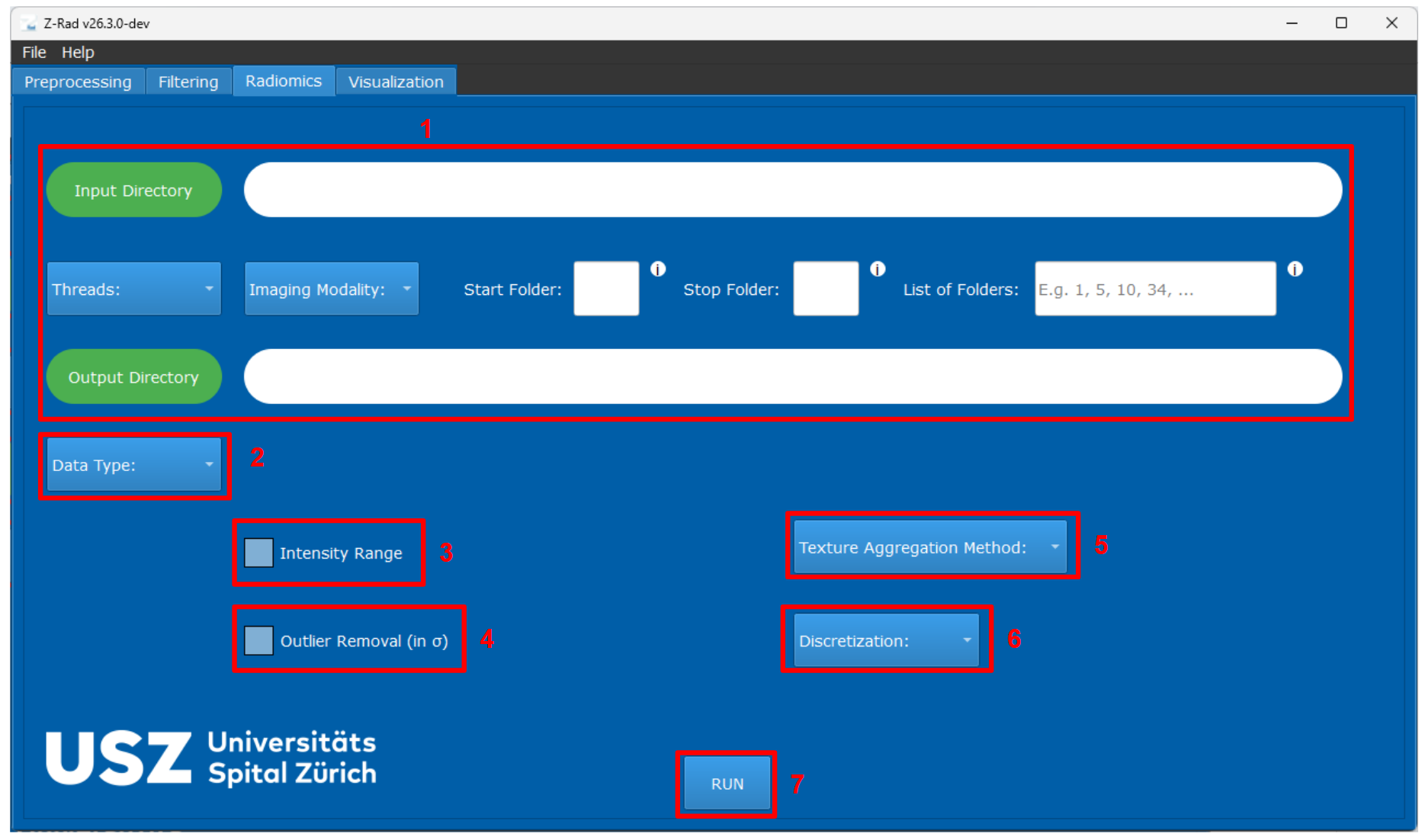
Radiomics extraction tab in the GUI.#
Main controls#
The numbers below match the annotated screenshot.
(1)Upper workflow sectionThe upper part of the radiomics tab follows the same layout as the preprocessing and filtering tabs. You use it to select the input directory, output directory, thread count, imaging modality, and the folders that should be processed.
(2)Data TypeSelect whether the input dataset is DICOM or NIfTI. As in preprocessing, this choice determines which data-type-specific fields become visible for image and mask selection.
(3)Intensity RangeKeep only voxels within the selected intensity interval for intensity and texture analysis. This restriction is applied before discretization and leaves the mask used for morphology unchanged. For fixed bin size texture or IVH discretization, the lower bound becomes the bin origin. See Re-segmentation guidelines.
(4)Outlier RemovalRemoves extreme voxel values based on a selected number of standard deviations calculated from the current valid intensity mask. If an intensity range is also configured, range re-segmentation is applied first. This can suppress unusually high or low intensities, but it can also create holes in the effective region of interest.
(5)Texture Aggregation MethodDefines how texture matrices are computed and merged. The GUI supports
2D,2.5D, and3Dstrategies, with merging or averaging rules depending on the selected option. See Feature extraction concepts for the available combinations and their Python equivalents.(6)DiscretizationControls how image intensities are discretized before texture feature computation. Choose
Bin Sizefor a fixed intensity width orNumber of Binsto divide each ROI’s intensity range into a fixed number of bins. Fixed bin size requires an intensity range to define the bin origin. The ordinary intensity-histogram family shares these prepared grey levels. This control does not set IVH discretization; the GUI chooses that from the modality and whether the image is filtered. See IVH-specific discretization.(7)RUNStarts radiomics extraction with the currently selected configuration.
For aggregation choices, supported feature families, and ROI size requirements, see Feature extraction concepts.
Extraction from filtered images#
For NIfTI input, provide both the original image in NIfTI Image and the
filtered image in NIfTI Filtered Image, together with the masks. All files
must be in the corresponding case folder, and names are entered without file
extensions. See GUI quickstart for the folder layout.
Intensity Range selects voxels using the original image; feature
intensities come from the filtered image. See Re-segmentation guidelines
and Discretization guidelines for range and bin settings.
Outputs#
After clicking RUN, open radiomics.csv in the selected output
directory. Each row begins with case and mask metadata, then
continues with the extracted radiomic features.
See Understanding results for column definitions, feature-name suffixes, and checks for missing cases or masks.
For a configuration example, see Radiomics extraction in GUI. For missing results or rejected settings, see Troubleshooting.